The Indie Dev's App Price Localization Cheat Sheet
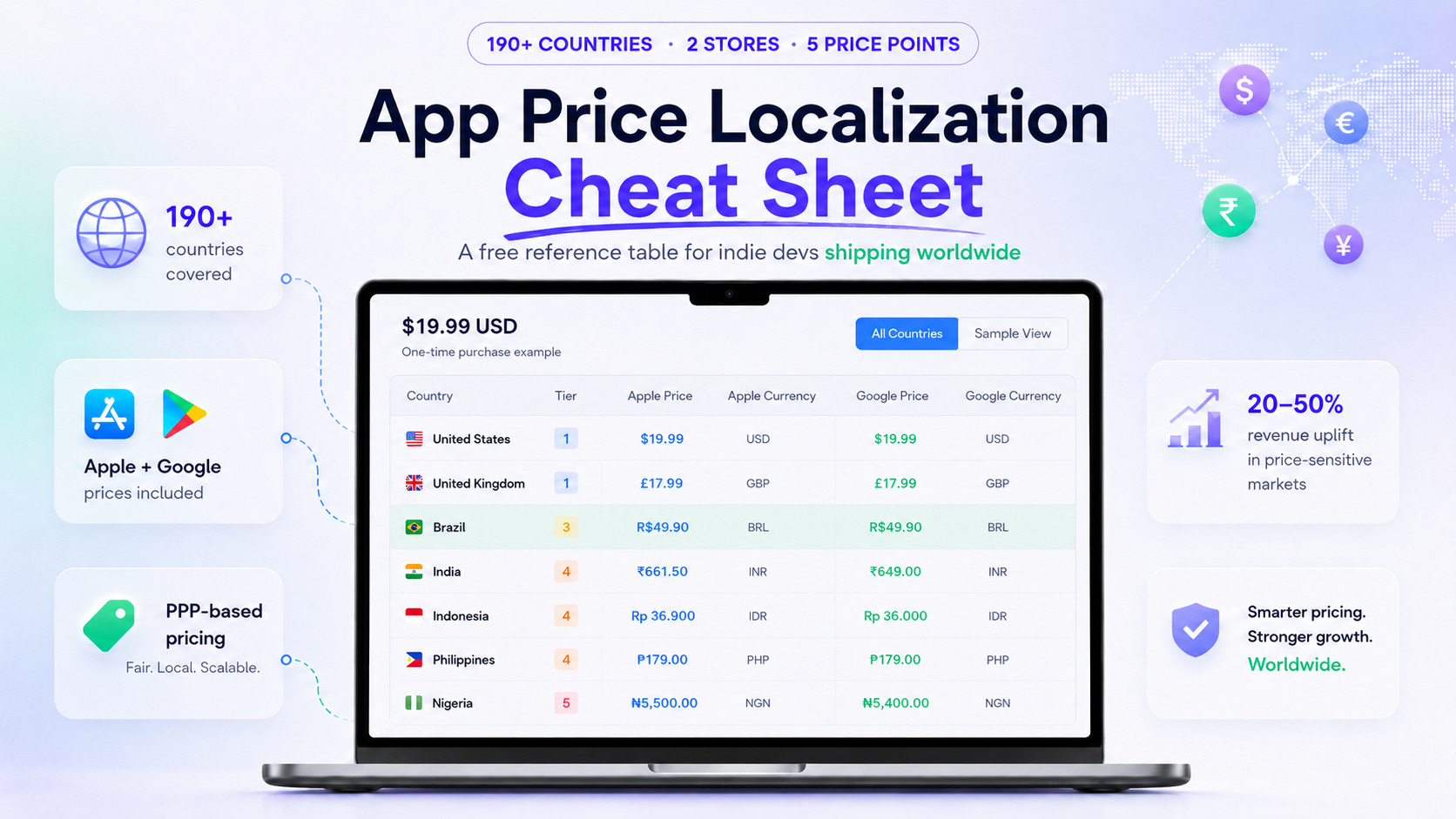
What $19.99 actually costs around the world: a free reference table covering 190+ countries with PPP-localized prices for both stores.

If you ship paid apps or subscriptions globally and you set the price once in USD, this post is for you.
I just ran a poll across LinkedIn, X, IndieHackers, Skool and Uneed asking indie devs how they handle pricing across countries. The most common answer was “flat USD everywhere” or “I let the stores convert it for me.” Neither of those is doing what people think it’s doing.
So I sat down with PricePush, exported the actual numbers it computes for five common base prices ($4.99, $9.99, $19.99, $49.99, $99.99) across all 190+ App Store and Google Play storefronts, and turned the result into the reference table I wish I had three years ago when I started price-localizing my own 8 apps.
This is that cheat sheet. Free, no signup, copy whatever you need.
The São Paulo problem
Imagine you charge $19.99 in the US for a one-time unlock. A user in São Paulo opens your app. What does Apple show them?
Two things might happen, depending on what you set up:
You picked $19.99 as your base and “automatically generate prices for other countries.” Apple takes the $19.99, runs FX, snaps to the nearest local price tier, and shows R$120 to the Brazilian user. Google does roughly the same.
You manually configured Brazil with PPP-aligned pricing. PricePush would show that user R$49.49.
Same app, same content, same support cost. R$120 in Brazil is roughly 4% of an average monthly income there. R$49.49 is closer to 1.5%. The first price doesn’t get bought. The second one does.
This is what “price localization for apps” actually means. It is not translation. It is not currency conversion. It is asking: what price makes sense for someone living in this country?
I wrote a longer breakdown of how App Store pricing by country actually works and the Google Play side here if you want the mechanics. This post is the reference table.
What the stores actually do (and don’t do)
Both Apple and Google have a feature called “auto-generate prices” or similar. People assume this is PPP. It is not.
What auto-generation does:
Takes your base price
Multiplies by current FX rate
Rounds to the nearest local price tier (Apple) or arbitrary local amount (Google)
Shows that price in the local currency
What it does not do:
Adjust for cost of living
Adjust for what people in that country can actually afford to spend on software
Account for charm-pricing conventions per market
I covered this in more detail in why the App Store doesn’t actually localize your prices. The short version: the stores convert currency. They do not localize purchasing power.
That gap is what this cheat sheet fills.
The $19.99 reference table (50 representative countries)
Below is what PricePush-v1 (a PPP-derived strategy I have refined over 3 years on my own apps) computes for a US base price of $19.99, exported directly from the live tool.
Two columns per country: the price Apple bills, and the price Google bills. They are billed in different currencies in 27 countries because the two stores impose different billing currencies in those markets (more on that further down).
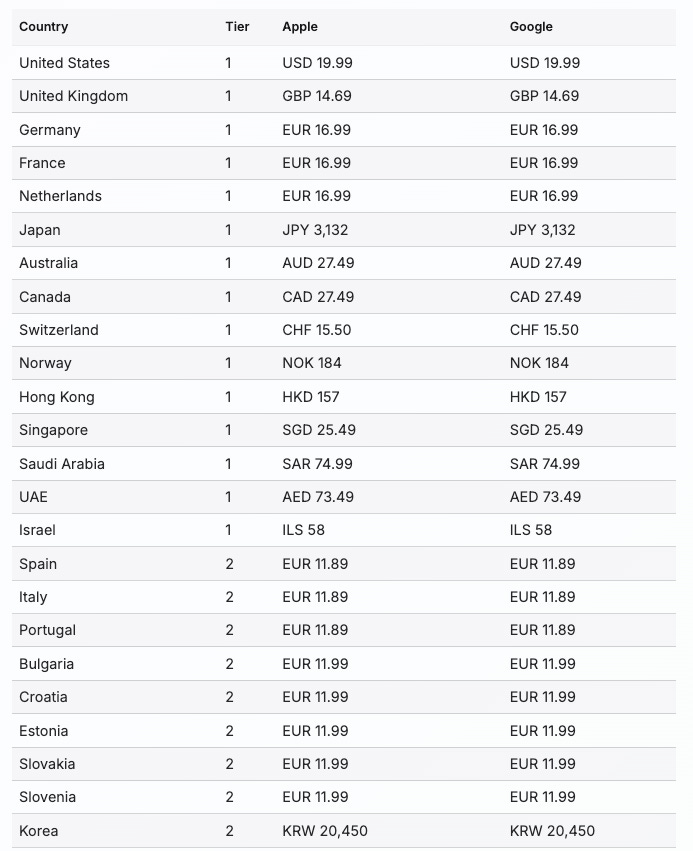
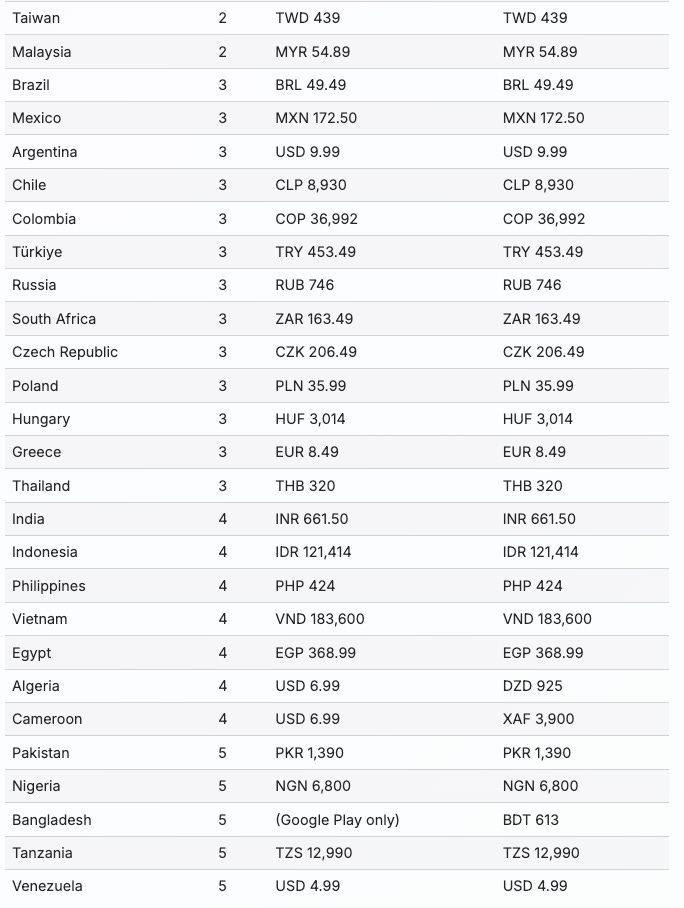
The “tier” column is shorthand for “PPP bucket.” Tier 1 is developed markets that pay close to the US anchor. Tier 5 is the most price-sensitive markets where roughly 25% of the US anchor is the right ceiling.
A small caveat: tier 1 countries don’t all pay exactly the US dollar equivalent. Some get a country-level adjustment (e.g., Israel ends up around 80% of the US-equivalent in ILS, while UAE and Saudi Arabia land near 100%). That’s because PPP isn’t a single global scalar; the strategy has per-country overrides on top of the tier multiplier. Use the tier as a rough guide, not a strict formula.
One more honest note on the numbers above. They come from the PricePush-v1 engine, which is the same one I use for my own 8 apps. The strategy started as a spreadsheet I maintained for years before PricePush existed, derived from the World Bank PPP indices and adjusted gradually as I learned what worked in practice. So this is not academic data, it’s what I actually charge.
That also means the numbers will change. FX rates move (the Argentine peso lost more than half its value in a year, the Turkish lira keeps drifting). Inflation reshapes things every quarter or two. And I refine the strategy itself when I learn something new from a market. Anything you see in the tables on this page is a snapshot from the day I exported it (2026-05-10), not a permanent truth. If you read this six months from now, the numbers will have shifted.
If you want today’s numbers for any base price, run them in PricePush yourself. The Starter plan is free, no credit card. The calculator inside it always reflects the current strategy and the latest FX rates, so you’ll never have to wonder whether a stale blog post is still accurate.
The shortcut: tier multipliers (use this for any base price)
You don’t need a 190-row table for every base price you ship. Once you know which tier a country falls into, the rest is multiplication. Here’s the shortcut:
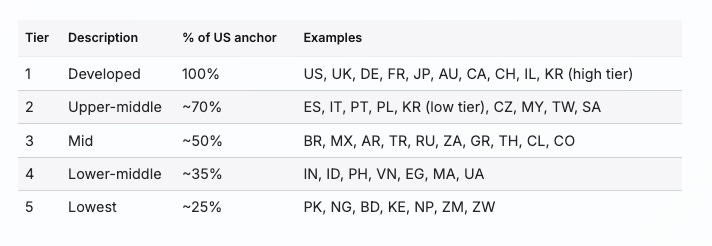
So if your US anchor is $9.99, India is roughly $9.99 × 0.40 = $4.00. PricePush actually outputs INR 330 for that case, which converts to about $3.95. Close enough that you can do the back-of-envelope in your head.
You can also flip this around. If you know what users in Brazil are willing to pay for your category, work backwards: BRL 49.49 ÷ 0.50 = your reasonable US anchor.
The rounding rules story (most cheat sheets skip this)
Here is something almost no other guide tells you: localizing the price is half the work. The other half is rounding it correctly for the local market.
PricePush-v1 ships 8 distinct rounding strategies, applied per market based on what feels native there. Here is the full set, taken straight from the export:
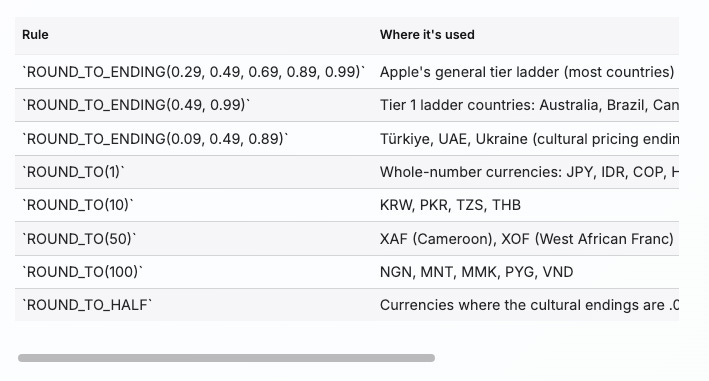
A single global rule, the kind most “auto-pricing” shortcuts use, gets a lot of these wrong. CHF 14.99 looks like a typo to a Swiss buyer. KRW 14,995 looks like a glitch to a Korean buyer. INR 661.49 looks weird to an Indian buyer. PricePush snaps to CHF 15.00, KRW 15,000, INR 661.50 instead.
Small thing. Big trust signal.
The cross-store divergence story (this one trips people up)
For one app, your prices are billed in different currencies on Apple vs Google in 27 countries (out of the 191 territories). This is not a mistake. It’s because Apple and Google use different billing currencies in those markets.
A few real examples from the $19.99 export:
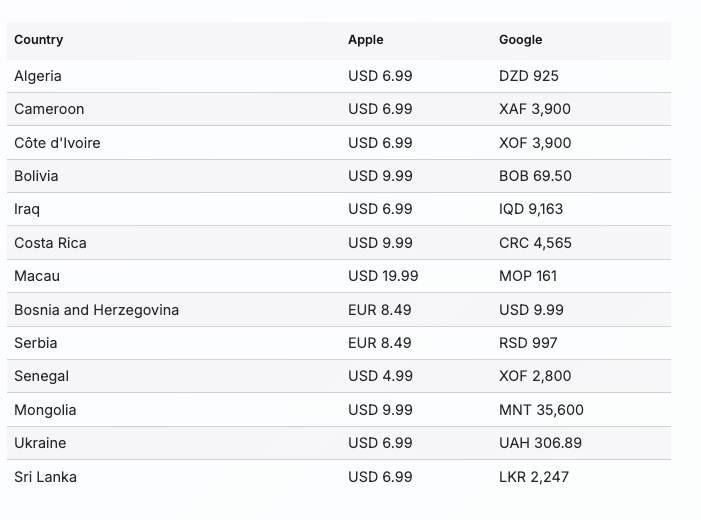
The pattern: Apple bills USD in many emerging markets where Google bills the local currency, and there are a few flips the other way (Bosnia, Serbia, Iceland). This is a constraint Apple and Google impose, not a choice you make. But it does mean that any pricing tool which gives you “one price per country” without accounting for the per-store currency difference is silently breaking your prices in 27 markets.
If you want a fuller breakdown of why this happens, the Apple side is here and the Google side here.
5 mistakes I’ve seen indie devs make
Five things I’ve watched people do (or done myself) that quietly cost money:
1. Trusting “auto-generate prices” as if it were PPP. It’s currency conversion plus a tier snap. A $19.99 base in São Paulo stays at the USD-equivalent of $19.99, which is 4x what local users would actually pay. Source: I unpacked this in detail here.
2. Using the same .99 ending in every country. Brazilians don’t price in .99 (they go .90). Indians round to whole numbers or .50. Swiss prices end in .00 or .50. Japanese end in 0. The .99 charm price is American. Other markets have their own.
3. Forgetting to refresh after FX shifts. The Argentine peso lost more than half its value in 2024. Prices set before that shift were wrong by 50% within a year. PPP recommendations need a quarterly check, not a “set once” ritual.
4. Pricing exotic currencies in USD by default. Algeria. Bolivia. Kazakhstan. Uzbekistan. Devs default to USD because “it’s easier.” It’s also wrong. Local users see USD, do the math themselves, and walk away. Algeria specifically is one where Apple bills USD (you have to) but Google can bill DZD (and should).
5. Manually editing 1,000+ fields per pricing refresh. 3 SKUs × ~190 countries × 2 stores = ~1,140 input fields per app per pricing pass. I’ve done this. It takes me a full week per round across my 8 apps. The math says automate this.
What public data backs this up
You don’t have to take my word for any of the percentages above. A few sources:
RevenueCat’s State of Subscription Apps 2026 reports a roughly 5x difference in revenue per install at Day 60 by geography. North America’s median is around $0.55, India and Southeast Asia sit closer to $0.11. I unpacked the localization implications of that report here.
Adapty’s State of In-App Subscriptions report identifies localized pricing as one of the highest-impact paywall experiment categories across the apps they have visibility into. Source.
Headspace is one of several large companies that have publicly attributed meaningful international revenue lifts to price localization, in Google’s Playtime 2019 talk on subscription price localization. The talk is older but the underlying principles still hold.
The pattern is consistent: when you stop charging price-sensitive markets the same flat USD price you charge in San Francisco, those markets start converting at rates closer to your developed-market rates. The increase in conversions usually more than offsets the lower per-unit price.
For my own portfolio across 8 apps, switching from flat USD pricing to PPP-derived prices produced revenue uplifts in the 20-50% range in international markets where the original USD anchor was furthest off PPP. Markets close to the US tier saw little change. Markets where the auto-converted price sat 2-4x above PPP (think tier 3, 4, and 5 countries) saw the biggest lifts.
How I do this for my own apps
I built PricePush because I was tired of running this process manually for my own portfolio. The data above came directly out of it: I clicked “Export CSV” five times (one per common base price) and pasted the results into this post.
You can call this category whatever you like: an app price localizer, a PPP calculator, a glorified spreadsheet with rate-limit handling. The job description is the same: take one anchor price, output 190+ correct local prices, keep them in sync as FX rates and inflation move, push the result to both stores.
It pushes prices to App Store Connect and Google Play in one click, with full history and one-tap rollback. It handles Apple’s price tier ladder, the per-store currency overrides for the 27 countries above, and the rate-limit dance in the background. It also lets you connect multiple developer accounts on one plan, which matters if you run more than one studio or work with clients.
You can use this cheat sheet without it. The static numbers will get you 80% of the way there for any one-time pricing refresh. But if you ship updates often, or run multiple apps, or want the per-country prices to refresh automatically as FX moves, then the math on the manual approach stops making sense pretty quickly.
You can try PricePush free here. The Starter tier is free forever, no credit card. If you voted in this week’s poll, the discount code POLL30 gives you 30% off any paid plan (valid through end of May).
Quick FAQ
Q: What is a price localizer? A price localizer is a tool that takes one base price (say $19.99) and outputs the right local price for every country your app sells in, accounting for purchasing power parity, the local currency, and per-store rounding conventions. An app price localizer like PricePush does this for the App Store and Google Play together, including the cases where the two stores bill in different currencies. The work is the same as the spreadsheets indie devs ran for years before dedicated tools existed; the difference is automation, FX refresh, and one-click push.
Q: Why $19.99 specifically? Honest answer: no rigorous benchmark behind that pick. It’s the anchor I use for annual plans on most of my own small utility apps, and a price point I see come up often when other indie devs share their numbers. The multipliers below work the same for any base price you choose, so pick the one that fits your category. I exported $4.99, $9.99, $19.99, $49.99, and $99.99 because those five cover most of the common indie-app price points; the math is identical at any other anchor.
Q: Where does the PPP data come from? World Bank PPP indices, with a 3-year overlay of A/B testing on my own 8 apps. The version PricePush-v1 ships is a derivative tuned for mobile-app reality, not raw World Bank tiers.
Q: How often should I refresh these prices? Quarterly is a good cadence for stable currencies. Monthly when you’re tracking a fast-moving currency like ARS or TRY. PricePush handles the FX refresh automatically; if you do this manually, set a calendar reminder.
Q: Can I just use the US price everywhere? Yes, and many indie devs do. You’ll leave 20-50% of potential international revenue on the table from users who would have bought at a price that fits their market. That’s the trade.
Q: What if my category has unusual willingness-to-pay? The PPP multipliers are a starting point, not a rule. Education apps, productivity apps, and entertainment apps all behave slightly differently. Use the table as a baseline, then A/B test if you have the volume.
TL;DR
Price localization for apps is two jobs: figuring out the right price per country, then pushing those prices to both stores without losing a week. The first job is a multiplication problem (use the tier table above). The second job is the manual grind that PricePush exists to solve.
If you only take one thing from this post: stop assuming that “auto-generate prices” or “let the stores localize for me” gives you PPP. It gives you currency conversion. PPP-aligned prices are a separate decision, and they typically lift international revenue 20-50% in price-sensitive markets when done right.
The reference table above is yours to use however helps. Share it. Quote from it. Build your own pricing strategy on top of it. If it’s useful, ping me on LinkedIn or X, I read every reply.
— Antonio